
Published · Updated
Best Free Personal Finance Software (2026): 8 Real Options
There is no single best free personal finance program. Choose GnuCash for detailed accounting, HomeBank for straightforward desktop budgeting, Money Manager Ex for desktop and mobile records, Actual Budget for local-first envelope budgeting, Firefly III for self-hosting, Empower for a free US investment dashboard, and PopaDex for free manual net-worth tracking.
The word “free” needs some care. Open-source software may be free to download but cost time or hosting fees. A free commercial dashboard may use the product to introduce paid services. A free tier may limit bank feeds or account counts. Those tradeoffs are not automatically bad, but they should be visible before you import financial history.
This comparison is for personal and household use. It is not a comparison of savings accounts, employer savings programmes, matched-savings administration, or software sold to financial institutions.
Disclosure: PopaDex is our product and appears in this comparison. We link to each project’s official site and explain when another option is a better fit. Features were checked on 1 September 2026; verify current platform support before installing.
Free net-worth tracking
Add one account and see your starting balance
Start with one bank balance, then add savings, investments or debts. Free Standard is for manual records in one consistent currency. Premium is for ongoing records across currencies or a connection after you confirm your exact institution and account type are supported.
Check the free plan before moving your finances
A free trial, a permanently free manual tool and free connected accounts are three different offers. Compare the work you must do after the first month.
- Decide whether the job is budgeting transactions, monitoring investments or tracking total net worth. Keep that requirement ahead of the word free.
- Check the limit that matters: accounts, history, bank sync, currencies or export. A paid upgrade is not a free feature just because it appears in the same product.
- Try two accounts and one debt before moving everything. Compare the total with your statements and make sure you can keep a usable copy of your data.
- Choose PopaDex Standard for manual net-worth tracking. Choose a different shortlist if automatic free US account aggregation or envelope budgeting is the requirement.
Before you commit: The PopaDex free offer does not include automatic bank sync. This comparison’s original product scope and source ledger remain available; a download or demo click is not a completed signup.
The eight free options at a glance
| Software | Best for | How it is free | Main limitation |
|---|---|---|---|
| GnuCash | Detailed desktop accounting | Open source and free to download | Accounting-style interface and learning curve |
| HomeBank | Simple desktop spending and budget reports | Open source and free to download | No managed cloud account or mobile app |
| Money Manager Ex | Cross-platform records and asset tracking | Open source and free to download | Sync is bring-your-own rather than a managed service |
| Actual Budget | Local-first envelope budgeting | Open source; self-host or pay a host | Setup is more technical than a commercial app |
| KMyMoney | Desktop double-entry personal finance | Open source and free to download | Desktop-first workflow |
| Firefly III | Technical users who want a self-hosted web ledger | Open source; self-hosting may cost money | You maintain the server, updates, and backups |
| Empower Personal Dashboard | US investment and retirement monitoring | Dashboard is free | US-focused; advisory services are the business model |
| PopaDex | Manual net worth across currencies | Free manual plan | Automatic compatible connections require Premium |
How we assessed “free”
Each product had to offer a usable no-cost path rather than a short trial. We then checked:
- whether it is open source, a permanent free tier, or a free service attached to another business;
- manual entry, file imports, and bank-feed options;
- supported desktop, web, and mobile platforms;
- budgeting, accounting, net-worth, investment, and multi-currency functions;
- export and backup options;
- the work required to install, host, update, and secure it.
We did not test every operating system, file importer, or bank connection. Download from official project pages and test a copy of your data before committing years of records.
GnuCash: best free desktop accounting
GnuCash is personal and small-business accounting software built around double-entry bookkeeping. The project lists bank, stock, income, and expense tracking; reports; scheduled transactions; and QIF, OFX, and HBCI imports. It supports Windows, macOS, Linux, BSD, and Solaris.
Choose GnuCash if:
- you want accounting-grade registers and reconciliation;
- investments and small-business records belong in the same file;
- you are willing to learn debits, credits, and account structure;
- local desktop files suit your backup process.
Skip it if you want a guided mobile experience or a managed cloud service. It is powerful, but it does not hide the accounting model.
Download GnuCash from the official project.
HomeBank: best for simpler desktop budgeting
HomeBank is a free desktop personal-accounting program. It supports imports and exports, categories, split transactions, scheduled transactions, budgets, cash-flow forecasts, multiple currencies, and reports. Official builds cover Windows and Linux; macOS availability is through third parties, so check the current download notes.
Choose HomeBank if you want spending analysis and budgets without GnuCash’s full accounting depth. It is a poor fit if seamless phone access or automatic managed bank feeds are requirements.
Review HomeBank’s current features and downloads.
Money Manager Ex: best free cross-platform record keeper
Money Manager Ex is an open-source personal-finance application for Windows, macOS, Linux, Android, and other supported platforms. It handles accounts, multiple currencies, transactions, scheduled entries, stocks, assets, budgets, attachments, reports, and QIF or CSV imports and exports.
The project uses a bring-your-own-cloud approach for people who want the database available across devices. That offers control, but you are responsible for the storage and sync arrangement.
Choose Money Manager Ex if you want more platform coverage and asset tracking than a basic desktop budget program. Test its sync and backup process before using the same database on several devices.
Actual Budget: best local-first envelope budget
Actual Budget is a local-first, open-source envelope budgeting app. It works offline, supports optional end-to-end encrypted sync, includes net-worth and cash-flow reports, and can import QIF, OFX, QFX, CAMT.053, and CSV files.
The software is free. Running a sync server can require your own server or a paid third-party host. Built-in bank-sync integrations are available for selected regions and may involve provider costs or setup.
Choose Actual if envelope budgeting and data control matter and you can handle setup. Use a managed commercial app if you do not want to maintain the sync service.
Try the Actual Budget demo or read its setup guide.
KMyMoney: best free Quicken-style desktop workflow
KMyMoney is a cross-platform desktop personal-finance manager built on KDE technology. It uses double-entry accounting principles and focuses on familiar personal-finance workflows.
Choose it if you want a traditional desktop application and prefer the KDE ecosystem. Compare imports, investment features, and platform packaging with GnuCash before moving your history; the right choice often comes down to file compatibility and which interface makes sense to you.
Firefly III: best self-hosted web ledger
Firefly III is a self-hosted personal-finance manager for people comfortable running web software. It supports accounts, transactions, categories, budgets, rules, and reporting. The application is open source, but hosting, backups, email, and bank-import integrations may add cost and maintenance.
Choose Firefly III if browser access and self-hosting are requirements. Do not choose it simply because the software licence is free. A server that is not patched or backed up is a poor place for financial records.
Review the Firefly III project.
Empower: best free US investment dashboard
Empower Personal Dashboard connects US financial accounts and provides spending, net-worth, investment, fee, and retirement tools. Empower states that the dashboard is free. Its broader business includes wealth-management services, so eligible users may receive advisory offers.
Choose Empower if you have compatible US accounts and want portfolio and retirement analysis without a software subscription. Choose another tool for open-source control, international bank coverage, or multi-currency household reporting.
Review Empower’s free financial tools or read PopaDex versus Empower.
PopaDex: best free manual net-worth tracker
PopaDex’s free Standard plan is for manual tracking of accounts, assets, liabilities, and net worth in one consistent currency. Premium is for ongoing records in original currencies or optional connections where the exact institution and account type are supported. Manual records remain useful for property, pensions, private assets, or overseas accounts that do not fit a transaction-focused budget app. Check the plan limits and USD billing terms before upgrading; compare other net-worth apps in our current tracker comparison.
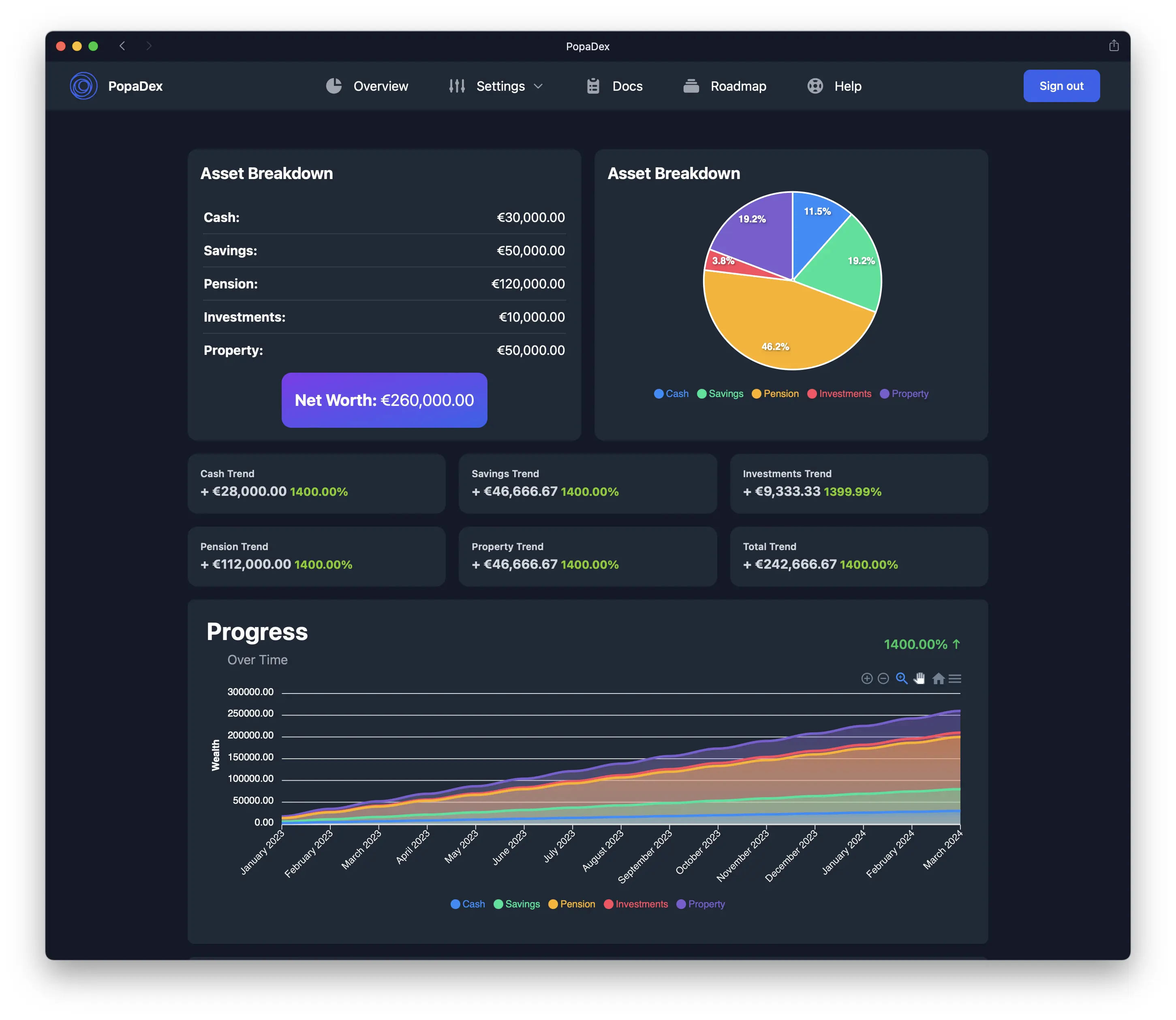
Choose PopaDex if:
- net worth matters more than daily transaction categorization;
- you need one view across currencies;
- manual monthly updates are acceptable;
- you may later want compatible institution connections.
Skip it if you need double-entry bookkeeping, receipt scanning, tax filing, or a zero-based budget. If your task is specifically ongoing records across original currencies, see the multi-currency tracking workflow. A bank connection is optional, and unsupported accounts remain manual.
Open the live PopaDex demo or start with the net worth tracker.
GnuCash vs HomeBank
This is the most common decision among free desktop users.
| Choose GnuCash when… | Choose HomeBank when… |
|---|---|
| You want double-entry accounting | You want simpler personal spending reports |
| Reconciliation and investment accounts matter | Budgeting and transaction analysis matter most |
| You can tolerate a steeper setup | You want a lighter interface |
| Small-business records may share the file | The file is for household finances only |
Neither is a managed cloud service. Backups are your responsibility.
When paying is the cheaper option
Free software is not free if maintenance causes you to stop using it. A paid product can be reasonable when it reliably imports accounts, gives a partner access, keeps devices synchronized, or reduces monthly cleanup.
Before upgrading, calculate the annual cost and name the exact task it removes. “More features” is not a reason. Saving two hours of manual reconciliation every month might be.
Compare paid options in the financial management software guide.
Free personal finance software FAQ
What is the best free personal finance software?
GnuCash is best for detailed desktop accounting, HomeBank for simpler desktop budgeting, Money Manager Ex for cross-platform records, Actual Budget for local-first envelope budgeting, Firefly III for self-hosting, Empower for a free US investment dashboard, and PopaDex for manual net-worth tracking.
Is there free personal finance software without bank syncing?
Yes. GnuCash, HomeBank, Money Manager Ex, KMyMoney, and the free PopaDex plan all support manual entry or file-based workflows. You avoid dependence on a bank-feed provider but must update the records yourself.
Is open-source personal finance software safe?
If you want a single place to review your balances before choosing a tool, start with the personal finance dashboard and check which accounts need manual entry.
Open source makes code review possible. Safety still depends on installation, updates, device security, encryption, and backups. Use official downloads and do not expose a self-hosted service to the internet without understanding its security requirements.
What is the best free alternative to Quicken?
GnuCash is the closest match for detailed registers and double-entry accounting. HomeBank and Money Manager Ex are easier for personal spending. Actual Budget is better for envelope budgeting. No free product reproduces every Quicken feature or managed bank feed.
Free without a dead end
Track manually now and automate later
PopaDex lets you build a net-worth history on the free manual plan. If updating compatible accounts becomes tedious, Premium adds an automation path without changing the financial model.