
Published · Updated
Best Net Worth Tracking Apps (2026): 8 Compared
Choose Empower for free US account aggregation and investment tools, Monarch Money for shared budgeting, Kubera for a broad wealth balance sheet, or Tiller if you want to work in Google Sheets or Excel. PopaDex is built for manual-first net worth tracking across currencies; its Premium plan adds multi-currency records and supported connections. PopaDex publishes this comparison, so its fit and limitations are described alongside the alternatives.
There is no universal winner. A tracker that works well for a US household with a 401(k) may be a poor fit for an expat with accounts, pensions and property in several currencies.
These recommendations cover tracking and planning tools. A provider that trades or rebalances investments is a different service; check whether it offers investment management or human advice before choosing one.
Best net worth tracker apps at a glance
| App | Best fit | Entry cost | Sync | Multi-currency | Check before paying |
|---|---|---|---|---|---|
| Empower | Free US investment, retirement and net worth tools | Free dashboard | Connected US accounts | No dedicated multi-currency view verified | US signup and institution coverage |
| Monarch Money | Household budgeting plus net worth | Core $99.99/year; 7-day trial | Connected accounts; coverage varies | No true multi-currency accounting verified | Paid subscription; confirm account coverage |
| Kubera | Complex assets and a consolidated balance sheet | Essentials $250/year; 14-day trial | Connected and manual assets | Yes | Annual cost; no day-to-day budgeting |
| PopaDex | Manual-first net worth and FIRE tracking across currencies | Free manual plan; Premium US$5/month or US$50/year billed annually | Premium; supported institutions only | Premium | Free plan uses one consistent currency; check connection support |
| Tiller | Google Sheets and Excel users | $99/year after a 30-day trial | Automated feeds for supported institutions | Templates are USD-focused; other workflows need customization | Requires spreadsheet upkeep; check institution support |
| PocketSmith | Cash-flow calendar and forecasting | Free plan; Foundation from $9.99/month billed annually or $14.95 monthly (USD displayed for US users) | Paid plans connect supported banks | Yes | Free-plan account and forecast limits |
| YNAB | Hands-on zero-based budgeting | $109/year or $14.99/month; 34-day trial | Select US, Canada, UK and EU institutions | One currency per plan | Net worth is secondary to budgeting |
| Quicken Simplifi | US cash-flow planning and budgeting | Regular price $6.99/month billed annually; current promotions and renewal prices vary | Supported US institutions | US-focused | Check renewal price and geographic fit |
The short answer by use case
- Choose Empower if you live in the US and want free investment, retirement and net worth tools.
- Choose Monarch Money if shared household budgeting matters as much as your balance sheet.
- Choose Kubera if you own crypto, private investments, property or other assets that ordinary budgeting apps handle poorly.
- Choose PopaDex if your accounts and assets span countries or currencies and you want to begin with manual tracking.
- Choose Tiller if you want automated account feeds without giving up Google Sheets or Excel.
- Choose PocketSmith if forecasting future cash balances is the main job.
- Choose YNAB if changing spending behaviour matters more than portfolio analysis.
- Choose Quicken Simplifi if you want a lower-cost US budgeting app with a net worth view.
Check the PopaDex workflow before you choose
Start with a free manual balance sheet in one consistent currency, then decide whether Premium's supported connections and multi-currency records fit your needs. Review the worked balance sheet, currency workflow, and plan limits.
Start free manual tracking or try the sample-data demo without signing up.
Monarch vs Empower: household budgeting or free US retirement tools?
For a US household, Monarch is the better fit when both partners want one paid place for transaction budgeting, shared goals and a net-worth view. Its current US Core plan is $99.99 per year after a 7-day trial; Plus is $199.99 per year and adds retirement forecasting and advanced investment analysis. Empower’s Personal Dashboard is free and includes a Retirement Planner and Investment Checkup, so it is a stronger first choice when US account aggregation and retirement analysis matter more than a shared budget. Empower also offers separate paid advisory services.
| Buying question | Monarch Money | Empower Personal Dashboard |
|---|---|---|
| Setup and account coverage | Connect household accounts, then build budgets and goals. Monarch says it serves the US and Canada and recommends USD or CAD accounts. | Link US financial institutions for dashboard, retirement and portfolio tools; check each institution and account type. |
| Assets and debts | Net-worth view across connected accounts, with household budgeting and goals. | Net-worth and investment view with connected accounts, including retirement accounts, property-related debt and loans. |
| Currencies | Official help recommends USD or CAD accounts; it does not document a multi-currency household balance sheet. | US-centered account workflow; no dedicated multi-currency reporting was verified in this desk review. |
| History and exports | Account and transaction history are available; historical exports are not a substitute for a reconciled cross-currency balance sheet. | Dashboard history and retirement scenarios; no matching international multi-currency export workflow was verified. |
| Cost and trade-off | $99.99/year for Core or $199.99/year for Plus, before any changing promotion. Its 7-day trial requires a payment method. Annual billing starts when it ends unless cancelled at least 24 hours beforehand; subscriptions auto-renew (pricing, cancellation terms). Choose it for budgeting and shared household work. | Free dashboard; separate advisory services are paid. Choose it for US-focused retirement and investment tools. |
This is a feature and source comparison, not a test of either live account-linking flow. A couple who mainly needs budgeting should keep Monarch on the shortlist; a US investor who wants retirement scenarios at no dashboard cost should start with Empower. A household whose current balances span currencies should first check the manual and conversion limits on its own records.
Kubera vs Empower: complex balance sheet or US investment analysis?
Kubera fits a household that needs a single balance sheet for mixed currencies, connected and manually valued assets, or nontraditional holdings. Its official Essentials plan is $250 per year. Empower is the stronger free starting point for US-connected accounts, retirement planning and portfolio allocation analysis. A US household with straightforward accounts may not need Kubera’s broader manual-asset toolkit; a household with private investments, foreign-currency property or other specialist assets may find Empower’s US-centered coverage too narrow.
| Buying question | Kubera Essentials | Empower Personal Dashboard |
|---|---|---|
| Setup | Add connected accounts where supported and enter other assets or debts manually. | Connect supported US accounts, then review the dashboard and planning tools. |
| Assets and debts | Built around a household balance sheet with manual entries for assets that cannot connect. | Connects banking, credit, loan, mortgage, investment and retirement accounts. |
| Currencies | Lets users enter assets in different currencies and select a portfolio reporting currency. | No multi-currency total was verified in the official material checked for this review. |
| Total and investable wealth | Kubera says it shows total net worth beside investable wealth, excluding assets that cannot be readily sold (official description). This can help separate a property’s contribution to total wealth from assets available to invest. | No equivalent total-versus-investable measure was verified in the official material reviewed. |
| History and exports | Kubera describes a dated daily balance-sheet history and spreadsheet export; this review did not test either workflow. | Stronger official evidence for retirement scenarios and Investment Checkup than for exporting a cross-border balance sheet. |
| Cost and trade-off | $250/year after the trial. Better fit when broad asset coverage and multi-currency totals justify the price. | Free dashboard; paid advisory is separate. Better fit for US account aggregation and retirement or investment analysis. |
Choose Empower if retirement planning and investment allocation are the decision you need to make. Choose Kubera if you need a broader wealth inventory, especially across currencies and manually valued assets. This comparison uses public documentation and product pages; no funded account or live connection was tested.
Kubera vs Monarch: wealth inventory or household money management?
These products answer different first questions. Monarch starts with household budgeting, transactions and goals, then adds a net-worth view. Kubera starts with a balance sheet, currencies and a wider range of assets. Monarch is less expensive at its Core tier ($99.99/year in the US); Kubera Essentials costs $250/year. Monarch Plus costs $199.99/year and adds forecasting and advanced investment analysis, but the official material checked here still describes Monarch as serving US and Canadian households and recommends USD or CAD accounts. Kubera documents foreign-currency entries and a selectable portfolio currency.
| Buying question | Kubera Essentials | Monarch Money Core / Plus |
|---|---|---|
| Setup | Build a portfolio from connected and manual balances. | Connect accounts, categorize transactions and configure a household budget. |
| Assets and debts | Broad balance-sheet inventory, including manual and specialist assets. Kubera also distinguishes total net worth from investable wealth, which excludes assets that cannot be readily sold (official description). | Connected accounts, net worth, investment tracking, spending and shared goals; no equivalent investable-wealth measure was verified in the official material reviewed. |
| Currencies | Foreign-currency assets can be entered and converted to a selected portfolio currency. | Monarch recommends USD or CAD accounts; a full multi-currency balance sheet was not verified. |
| History and exports | Daily balance-sheet snapshots and spreadsheet export are described by Kubera; not independently tested here. | Budget, transaction and net-worth history support household reviews; not a cross-border archive tested here. |
| Cost and trade-off | $250/year. Better fit for a wealth inventory and diverse currencies. | Core $99.99/year; Plus $199.99/year. A 7-day trial requires a payment method. Annual billing starts when it ends unless cancelled at least 24 hours beforehand; subscriptions auto-renew (pricing, cancellation terms). Better fit for budgeting, household collaboration and US/Canada account workflows. |
Keep Monarch if the transaction budget, household collaboration or its Plus forecasting is doing useful work. Consider Kubera if the missing part is a consolidated international balance sheet or manual coverage for complex assets. Neither product should be chosen from this desk review alone: check your exact accounts and export needs before moving records.
Apply one household across the shortlist
The shared example is fictional and uses the same balances on both review dates: UK cash rises from £12,000 to £12,500; a UK pension remains £30,000; euro savings remain €10,000; a home remains €240,000; and the mortgage remains −€150,000. At the example’s fixed rate of €1.20 per pound on 1 August and €1.18 on 1 September, the EUR-reported total moves from €150,400 to €150,150. The bridge is +€600 from the cash change at the first rate and −€850 from the rate change on the second-date GBP balances. These are illustrative fixed rates, not market quotes or investment returns; the underlying balances and method are available for inspection.
The table applies that exact balance sheet as a buying question using current published product information. It describes documented fit and known limits; it does not claim that we entered the household into a competitor product, reproduced its totals, or measured setup time. PopaDex’s row points to our own published worked balance sheet and monthly-review evidence. All competitor rows are desk research; plans, institution support and conversion methods should be checked before purchase.
| Product | Setup and assets/debts | Currencies, history and exports | Decision for this household |
|---|---|---|---|
| PopaDex | The published worked example uses these five records and review dates. Standard supports manual records in one consistent currency; Premium supports ongoing original-currency records and a reporting total. | The two-date example and monthly review are first-party evidence. Optional connections remain subject to institution and account-type support. | First-party product evidence maps directly to the example; it is not evidence that competitors were tested. Prices are in the table above. |
| Kubera | Official materials describe connected or manual accounts, retirement assets, property and debts, with total net worth and investable wealth shown separately. | It documents any-currency balances, a reporting currency, daily snapshots from setup and spreadsheet exports. Product FX—not the fixture’s fixed rates—would determine totals; workflows were not tested. | Documented fit in principle for a complex cross-currency balance sheet. Essentials is $250/year; weigh broad asset coverage against cost. |
| PocketSmith | Official material documents accounts, offline assets and liabilities, including property and mortgages. | It documents base-currency net worth and conversion at daily rates. Official guides describe net-worth history; export of this exact mixed-currency balance history was not verified. | Documented fit in principle, with deeper cash-flow planning if that is also the job. Rates and totals differ from the fixed illustration. |
| Empower | Its free dashboard connects US banking, investment and retirement accounts. The sources reviewed do not establish this household’s UK/EU pension, property and debt workflow. | A GBP/EUR balance sheet, EUR reporting total and related export/history workflow were not verified in the sources reviewed. | Better documented for US account aggregation, retirement planning and Investment Checkup. Dashboard tools are free; advisory services are separate. |
| Monarch Money | It connects household accounts for budgeting, goals and net worth. The documented market is the US and Canada. | Monarch recommends USD or CAD accounts; the sources do not document this household as one EUR-reported balance sheet. It does offer CSV downloads of transaction and balance history (official guide). | Keep it on the shortlist for budgeting and household collaboration, not this unverified cross-currency total. Core is $99.99/year and Plus $199.99/year before promotions. |
| Tiller | The Foundation Template records linked account balances and history; custom assets/formulas remain spreadsheet work. Tiller says it cannot connect UK or EU banks. | Templates are built for USD and US date formats; custom-currency changes are outside supported template behavior. Building this GBP/EUR conversion would be the spreadsheet owner’s maintenance, not a tested Tiller workflow. | Best when spreadsheet control and supported feeds matter more than automatic cross-currency consolidation. $99/year after the 30-day trial. |
| YNAB | Its spending plan is organized around budget accounts. The exact property/pension balance-sheet workflow was not verified in this review. | YNAB recommends separate plans for separate currencies; one plan cannot combine GBP and EUR into one EUR balance. Plan-data export does not create a converted history across plans. | Better fit when zero-based spending decisions are the priority than for this consolidated balance-sheet review. |
| Quicken Simplifi | Simplifi supports manual assets and liabilities as part of net worth. | It supports USD or CAD one currency at a time, not the fixture’s GBP/EUR balances and EUR total. Net-worth history starts at setup/account addition; older balances can be imported (official guide). A multi-currency export path was not verified. | Keep it for US/Canada cash-flow planning and budgeting, not this cross-border example. |
Official sources for competitor rows were checked on 5 October 2026: Kubera net-worth tracking, PocketSmith features, multi-currency guidance and net-worth report/history, Empower tools and Retirement Planner, Monarch availability and currency FAQ and history-download guide, Tiller currency guidance, Tiller connection guidance and Foundation Template guide, YNAB’s multiple-currency guide and export guide, and Simplifi currency support, net-worth guide and balance-history import guide. These links support source-based comparisons; none represents a hands-on competitor test.
The checks above use official product and help pages reviewed on 5 October 2026: Monarch pricing, Monarch country and currency guidance, Empower Personal Dashboard tools, Empower Retirement Planner, Kubera Essentials pricing, Kubera currency entry, and Kubera history and export. These are current desk-researched claims, not hands-on competitor test results.
A public calculator check: a correct total is only the start
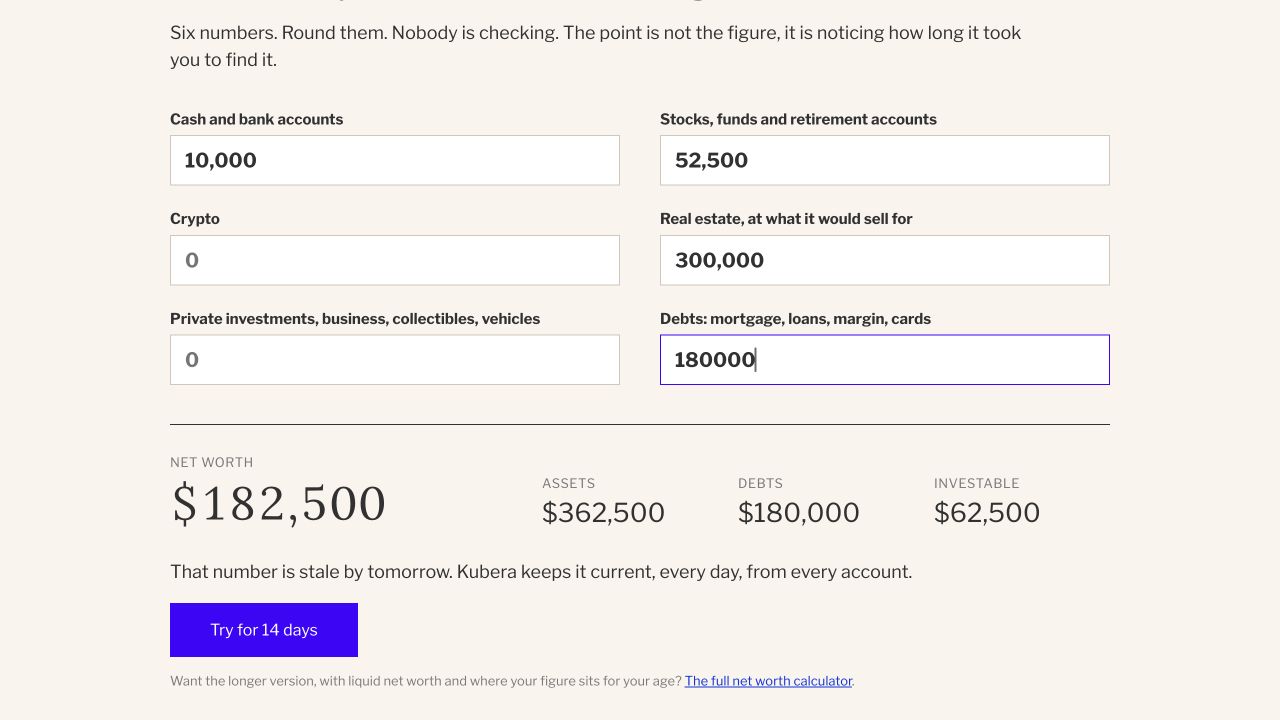
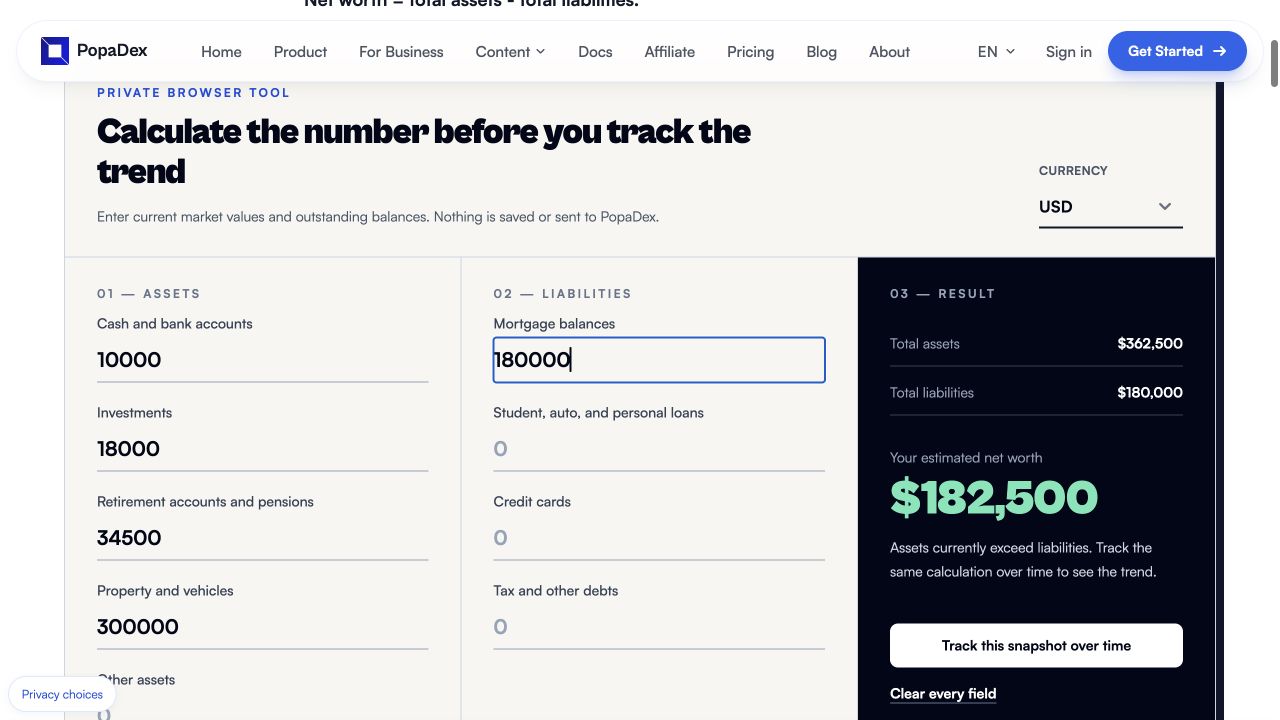
On 21 October 2026, we entered a separate, fictional USD-only balance sheet into Kubera’s public calculator and the PopaDex public calculator: $10,000 cash, $18,000 taxable investments, $34,500 retirement assets, a $300,000 home and a $180,000 mortgage. Kubera’s form combines investments and retirement, so that field received $52,500. Both displayed $362,500 in assets, $180,000 in debt and $182,500 net worth.
| Visible calculator result | Kubera public calculator | PopaDex public calculator |
|---|---|---|
| Initial net worth | $182,500 | $182,500 |
| After increasing only taxable investments by $1,000 | $183,500 | $183,500 |
| Additional measure in the initial result | $62,500 labelled investable | No investable figure |
The practical distinction is the next question, not the subtraction. Kubera’s public form combines the pension with other investments, so its displayed investable figure does not establish when that pension can be accessed. PopaDex’s public calculator separates the inputs but does not calculate accessible capital either. Before choosing a FIRE workflow, check how it handles pension access, reserves and ownership rather than treating either headline figure as spendable money.
This is a test of public calculators, not the authenticated tracker apps. The second check was an edited input, not an FX movement. We did not test saved records, bank sync, currency conversion, exports or security in either app through this check. PopaDex publishes this comparison and operates one of the calculators. The input mapping, observed outputs and limits are available as JSON. For the recurring job, use the dated multi-currency review and the account-test protocol below; a one-off calculator cannot verify that workflow.
See the initial public-calculator results
What is the best app for tracking net worth for FIRE?
PopaDex is the closest fit when you want ongoing net worth history, a FIRE number, accessible-versus-pension tracking, and multiple currencies in one app. Empower is stronger for US users who want free connected accounts and a more detailed retirement planner. ProjectionLab is stronger for deep scenario modelling, Monte Carlo simulation, and historical backtesting.
Those products solve slightly different jobs. A FIRE tracker tells you whether your current financial picture is moving toward the target. A planning tool explores a wider range of possible futures. Some people will use both.
| Choice | Best when | FIRE strength | Main trade-off |
|---|---|---|---|
| PopaDex | Your net worth spans accessible investments, pensions, property, or several currencies | Tracks the FIRE number, estimated date, savings rate, and actual net worth together | Uses a smooth-return estimate, not Monte Carlo simulation |
| Empower | You are in the US and want connected net worth plus retirement planning at no cost | Its Personal Dashboard combines net worth with a Retirement Planner and scenario testing | US-focused account coverage and signup |
| ProjectionLab | Detailed modelling matters more than a lightweight tracking workflow | Free Basic includes Monte Carlo simulation and historical backtesting; Premium adds withdrawal and tax tools | More setup; advanced planning features cost $129 per year |
| Monarch Money | A couple wants budgeting and goals to drive the savings rate | Shared budgeting makes income, spending, and goal progress visible | No true multi-currency accounting and no permanent free plan |
PopaDex is our product, so treat that recommendation with the disclosed conflict in our methodology below. Choose Empower instead for a free US retirement dashboard. Choose ProjectionLab if probability testing and detailed future scenarios are the main job; it is a specialist planning product and is not counted among the eight general net worth trackers reviewed on this page. ProjectionLab’s official feature and pricing page lists its free and paid planning capabilities, while Empower documents its Retirement Planner.
See the PopaDex FIRE tracker app for the product workflow, or read the calculator methodology before relying on an estimated date.
Multi-currency net worth
Track accounts, property, pensions and debts in one place
PopaDex Premium keeps ongoing records in original currencies and converts the total into one base currency. Start manually with one consistent currency for free, then add a supported connection if you need it.
How we evaluated the apps
We used the same six questions for every product:
- Does it track assets and liabilities, rather than only spending?
- Can it preserve a useful history of net worth?
- Which accounts and manual assets can it include?
- Does it support automatic account connections?
- Can it handle more than one currency correctly?
- What does the user pay, and what is missing from the entry-level plan?
This is a desk-researched comparison based on public product pages and support documentation. We did not open funded financial accounts in every product, so we do not claim hands-on testing where none occurred. PopaDex is our product. It receives no paid placement here, and other products are recommended when they are a better match.
The official pricing and product pages linked in the table were rechecked on 5 October 2026. This remains desk research: we did not open funded competitor accounts or test live bank connections. Offer prices, institution coverage and plan features can change after publication.
A reproducible net-worth tracker test
Use the same fictional balances to evaluate a tracker, document what happened, and separate observed behavior from advertised features. This is our suggested test protocol, not an independent review or a completed hands-on comparison.
Record the date, product, plan, country, browser, reporting currency and any review-access or commercial relationship. The public PopaDex demo has its own sample portfolio; do not expect its totals to match this fixed fixture.
- Enter a manual balance sheet. In an authorized test account, enter cash, taxable investments, a pension, a home and a mortgage from the five-account example. Follow the product's debt-entry convention. Record unsupported account types.
- Check valuation. At the fixture's fixed exchange rates, expected net worth is EUR 182,500. If a tool requires current market rates, record them and calculate the matching expectation instead of treating a different rate as a failure.
- Isolate an FX change. Where the tool allows it, change USD from 0.90 to 0.95 EUR per unit without changing balances. The expected total rises by EUR 1,000. Note whether the interface distinguishes this from new savings.
- Check access and ownership. Record what the tool actually supports. The standalone FIRE worksheet illustrates access and reserve assumptions; it is not evidence that every tracker implements those fields or imports that file.
- Inspect updates and exports. If available, review saved history and exported fields. Export does not establish re-import, Mint transaction migration or budgeting parity. Mark any untested step plainly.
- Recheck the offer and limits. Use the current pricing and security scope. Test bank sync only with legitimate access and describe the exact institution/account type checked.
For a completed, narrower check, see the 21 October public-calculator results and observed-output ledger. This single-currency check does not establish how either authenticated tracker handles the five-account protocol.
Use “observed,” “not supported in this tested plan,” “not tested,” or “unable to determine” for each result. Keep screenshots free of real customer data. We welcome critical conclusions and do not require publication, a link, or a favorable review. Prepared 9 September 2026.
Download the evidence behind the table
Test your shortlist with the same five accounts
Use the worked example below to make a fair comparison. You do not need to connect a real bank to check basic arithmetic, debt handling and currency presentation.
- List your must-haves first: country and bank support, currencies, manual property and pension entries, household permissions, export, and the price after any introductory offer. Disqualify a product that misses a requirement before comparing design.
- Enter the same fictional cash, investment, pension, home and mortgage balances in each accessible trial or demo. Record what could not be entered; do not silently remove the difficult accounts.
- Check EUR 182,500 against the worked calculation. Change only the illustrative USD exchange rate, where the product permits it, and expect a EUR 1,000 difference. Record whether rates are editable, fixed, live or unavailable.
- Make a dated balance update, then inspect history and the exported file. Check whether currencies, dates and debts survive. Keep your source file until a migration is reconciled.
Before you commit: This is a reproducible test protocol, not a claim that we ran it in all eight products. The comparison remains desk research; the PopaDex screenshot and public demo are identified separately.
The comparison source ledger (CSV) contains the eight products, the criteria summarized above, each official source URL, the verification date, and the evidence boundary. It is designed for readers, reviewers, and journalists who want to inspect or reuse the structured facts without extracting this article.
The ledger is a dated desk-research snapshot, not a live bank-coverage guarantee or a hands-on test of every connection. Prices, trials, institution support, and features can change; verify a shortlisted product against its linked official source and test the required institution before paying.
1. Empower: best free tracker for US investors
Empower’s Personal Dashboard connects banking, credit, loan, mortgage, investment and retirement accounts. Its free tools include net worth, portfolio analysis, cash flow and retirement planning.
Choose Empower when most of your finances are in US institutions and investment analysis matters. It is unusually capable for a free product. The trade-off is its business model: Empower also sells wealth-management services, and signup requires contact information. People outside the US or with several currencies should look elsewhere.
Cost: Free for the Personal Dashboard and financial tools. Paid advisory services are separate.
Skip it if: you need broad international bank coverage or true multi-currency reporting.
2. Monarch Money: best for couples who budget together
Monarch Money combines budgeting, transactions, goals, investments and net worth in one household account. A partner or adviser can collaborate without maintaining a separate financial file.
Monarch is a good fit when both people want to use the same polished budgeting system. It is less convincing for international households because the product does not provide true multi-currency accounting. There is no permanent free plan.
If the main job is combining individual accounts, joint assets and shared debts rather than maintaining a household budget, compare the narrower options in our net worth tracker for couples guide.
Cost: Monarch’s U.S. Core and Plus annual plans are $99.99 and $199.99 before promotions. The 7-day trial requires a payment method. Annual billing starts when it ends unless cancelled at least 24 hours beforehand; subscriptions auto-renew (pricing, cancellation terms). Check the current offer before subscribing.
Skip it if: your assets are denominated in several currencies or you only want a balance-sheet tracker.
3. Kubera: best for complex and alternative assets
Kubera is built around the balance sheet rather than a monthly budget. It can represent property, vehicles, crypto, private investments and other assets alongside connected financial accounts. It also supports multiple currencies.
That breadth is the reason to pay for Kubera. The other side of the decision is equally clear: it is expensive compared with mainstream budgeting apps and does not try to manage daily spending. Kubera also distinguishes total net worth from investable wealth, which excludes assets that cannot be readily sold (official description). If Kubera is on your shortlist, compare the Kubera vs Empower decision and the adjacent Kubera vs Monarch section on this page.
Cost: Kubera lists Essentials at $250 per year. Confirm the live price on its website.
Skip it if: you need budgeting or want a low-cost tracker for a simple set of accounts.
4. PopaDex: best for a free manual starting point and paid multi-currency tracking
PopaDex is a net-worth-first dashboard for accounts, investments, property, pensions and debts. Manual tracking in one consistent currency is free. Premium supports ongoing records in original currencies, one converted base-currency total, and optional connections where the exact institution and account type are supported.
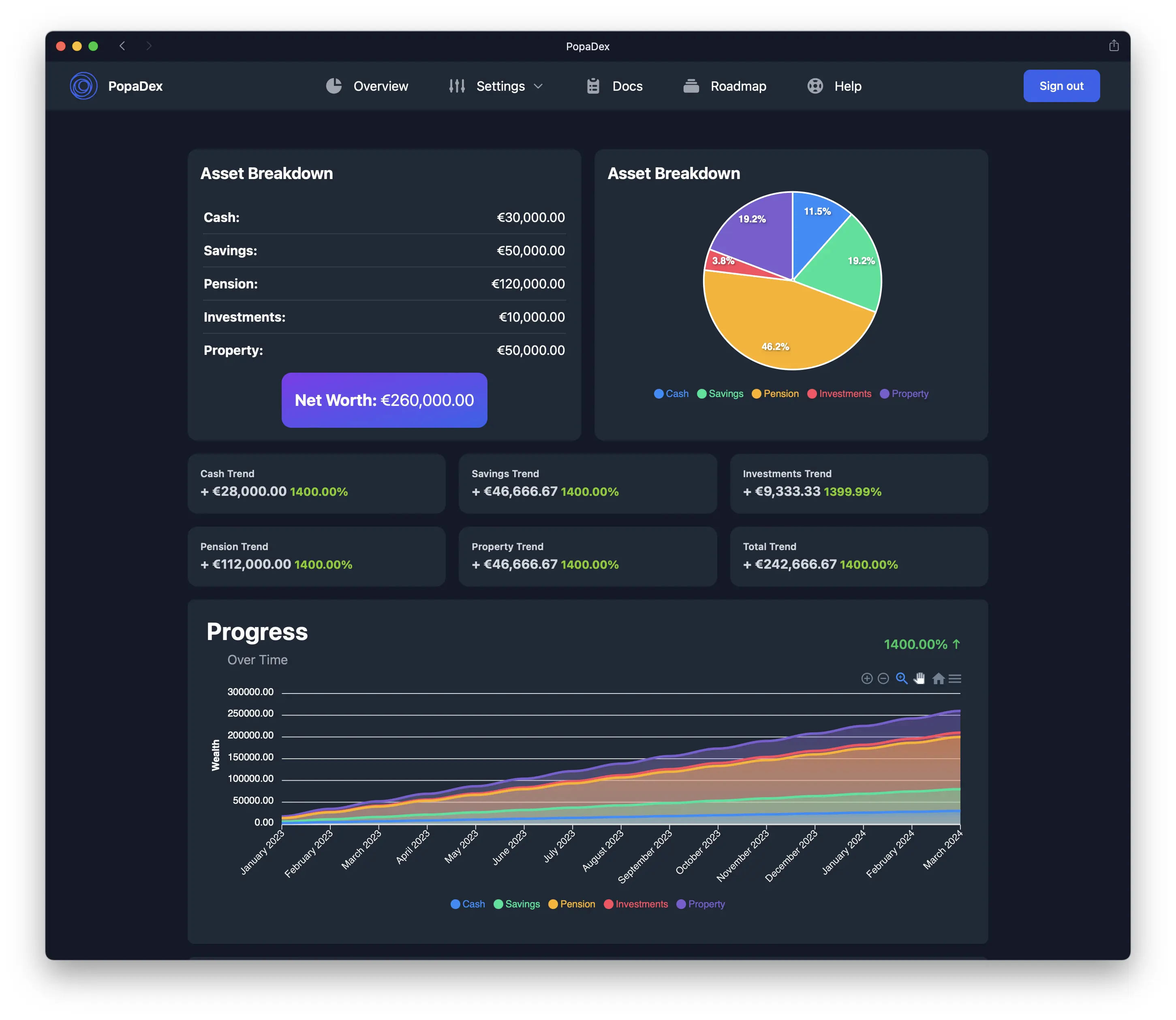
This PopaDex image uses sample data. A separate six-step screenshot walkthrough shows the dashboard, dated history, manual account inventory, original-currency records, cash-flow view and FIRE scenario. The screenshot evidence manifest records the older editorial assets, file hashes and publication caveat. This first-party product evidence does not turn the competitor entries into hands-on tests.
PopaDex works best for expats, internationally mobile households and people whose assets do not fit neatly into one domestic banking system. Manual accounts cover property, pensions and anything that cannot be connected automatically. It is not a replacement for a transaction-level budgeting method such as YNAB.
Cost: Free manual plan. Premium is US$5 per month or US$50 per year, billed annually.
Skip it if: you need automatic bank sync on a free plan or detailed envelope budgeting.
See how the PopaDex net worth tracker works or open the live demo.
If YNAB is on your shortlist, the dedicated YNAB alternative for expats explains where a global balance sheet complements—rather than imitates—zero-based budgeting. If you are leaving a product, use the switching and archive checklist before cancelling it; an export is not evidence of direct import compatibility.
5. Tiller: best automated spreadsheet tracker
Tiller sends balances and transactions to Google Sheets or Microsoft Excel. Its templates provide a starting point, while formulas, categories and reports remain editable.
Tiller is the best choice here for spreadsheet users who want automatic data feeds. It is a poor fit for someone who wants an opinionated app that works without spreadsheet maintenance. Our PopaDex vs Tiller comparison covers the dashboard-versus-spreadsheet decision.
Cost: $99 per year after a 30-day trial, according to Tiller’s pricing page.
Skip it if: you dislike spreadsheets or want a conventional mobile-first finance app.
6. PocketSmith: best for cash-flow forecasting
PocketSmith organises finances around a calendar and forecasts future balances. It supports multiple currencies. Its free tier is limited to two accounts and six months of projections, while paid plans add more connected banks and longer forecasts.
PocketSmith is useful when the question is “what will my cash position look like next year?” Free accounts do not include automatic bank feeds; paid plans add feeds for supported institutions. Its investment reporting is less specialised than a portfolio tracker. Compare the products directly in PopaDex vs PocketSmith.
Cost: Limited free plan plus paid tiers. See current PocketSmith pricing.
Skip it if: holding-level portfolio analytics is your main requirement.
7. YNAB: best when budgeting behaviour comes first
YNAB is a zero-based budgeting system with net worth reporting. Its strength is the workflow around allocating income and making spending decisions, not cataloguing every type of wealth.
YNAB is a strong choice if you will actively maintain a budget. It is less suitable for a global balance sheet because each plan uses one currency, and accounts using different currencies should not be mixed in the same plan.
Cost: $109 per year or $14.99 per month, with a 34-day trial, according to YNAB’s pricing page.
Skip it if: you need one converted total across currencies or advanced investment reporting.
8. Quicken Simplifi: best for straightforward US and Canadian cash flow
Quicken Simplifi combines spending plans, bills, savings goals, investments and projected cash flow. It also shows net worth from connected and manual accounts.
Simplifi suits US and Canadian users who want budgeting and short-term forecasting without Monarch’s higher annual price. It is not designed around broader international account aggregation or multi-currency wealth. Quicken runs introductory offers, so compare the renewal price rather than relying on the first number shown.
Cost: Annual subscription. Check Quicken’s current plan comparison.
Skip it if: your finances span countries or you want a permanently free plan.
What matters in a net worth app
Complete asset and debt coverage
A tracker is only as useful as the accounts it includes. Check whether it can represent bank accounts, investments, pensions, property, business interests and debts. Manual entries matter because no aggregation service connects to everything.
A history you can keep
The current number is a snapshot. The useful part is the monthly or quarterly trend. Before choosing an app, check how it handles imported history and whether you can export your data later.
Correct currency treatment
Renaming every balance as USD, EUR or GBP is not multi-currency support. A genuine multi-currency tracker stores the original denomination, applies an exchange rate and shows both the local value and converted total. Read our multi-currency net worth guide if this is a deciding factor.
A privacy model you accept
Automatic account aggregation is convenient, but it means sharing financial data with the app and its connection providers. Read the privacy policy, use a unique password and enable multi-factor authentication. If you do not want to link accounts, start with manual entry or a Google Sheets net worth tracker.
App versus spreadsheet
Use a spreadsheet when you want full control, update infrequently and do not mind maintaining formulas. Use an app when you want saved history, automatic aggregation, household access or currency conversion.
The two approaches can coexist. A spreadsheet can be your portable annual record while an app handles regular updates. The important part is to avoid double-counting the same account.
If a zero-cost desktop or open-source workflow is the priority, compare the best free personal finance software. If holding-level investment analysis matters more than the household balance sheet, start with the investment portfolio tracker guide instead.
How to choose without wasting a subscription
- List every account, asset, liability and currency you need to include.
- Remove products that do not support your country or essential institutions.
- Decide whether budgeting, investments or net worth is the primary job.
- Test one full monthly update during the trial period.
- Export a sample before paying, so you know how easy it is to leave.
Do not connect every account merely because an app offers a trial. Start with one institution, review the imported data and security settings, then add the rest.
Frequently asked questions
What is the best app to track net worth?
Empower is a strong free choice for many US users. Monarch Money is better for shared household budgeting, Kubera for complex assets, Tiller for spreadsheet users and PopaDex for multi-currency households. Your country, asset types and preferred level of automation decide the winner.
Which app is best for tracking net worth for FIRE?
PopaDex is a good fit when you want net worth, accessible investments, pensions, multiple currencies, and a simple FIRE estimate together. Empower is stronger for free US account aggregation and retirement scenarios. ProjectionLab is stronger for detailed FIRE modelling and probability testing. Choose based on whether ongoing tracking or deeper planning is the primary job.
What is the best free net worth tracker?
Empower provides free connected tracking for US users. PopaDex has a free manual plan for one consistent currency; ongoing multi-currency records require Premium. A Google Sheets or Excel template is another free option if you prefer to keep updates manual and convert mixed-currency values yourself.
Can I track net worth without connecting my bank?
Yes. Use manual accounts in a tracker or maintain a spreadsheet. You will need to update balances yourself, but you avoid giving an aggregation provider access to account data.
Which net worth apps support multiple currencies?
PopaDex, Kubera and PocketSmith support multiple currencies. The exact method and supported features differ, so check whether the app converts balances into one base currency or merely labels accounts with different currencies.
How often should I update my net worth?
Monthly is frequent enough for most households. Quarterly can work when most assets are illiquid or manually valued. Consistency matters more than checking daily market movements.
Are net worth tracker apps safe?
No financial app is risk-free. Prefer reputable providers, read how account connections work, enable multi-factor authentication and use a unique password. Choose manual tracking if you are not comfortable sharing financial account data.
Sources and review notes
Product facts and prices were checked using official pages from Empower, Monarch Money, Kubera, Tiller, PocketSmith, YNAB and Quicken. The comparison was updated from official product pages on 5 October 2026. No funded competitor accounts or live connections were tested.
Try the product
Build a complete net worth history
Start with free manual tracking in PopaDex. Add accounts in their original currencies, include property and debts, and upgrade only if you want supported bank connections.
Wealth management apps, spreadsheets, and Kubera
A net-worth tracker answers “what do I own and owe today?” A wealth-management platform may also offer advice, custody, portfolio analysis, or managed investments. Compare those functions separately; a tracker should not be described as an investment adviser simply because it shows allocation charts. A spreadsheet offers full control and offline copies, but requires manual updates and reliable backups. A budgeting app such as Mint historically centered transaction categorization, which is a different workflow from consolidating asset balances.
Kubera is a useful comparison for people with varied asset types. Check whether each app supports the exact institutions, currencies, private assets, manual entries, exports, and history you need. Compare current published prices at the point of purchase, since plan details change. PopaDex focuses on cross-country net-worth snapshots; its optional account connections depend on supported institutions and plans.
PopaDex versus Kubera
This is a published-feature comparison checked against product documentation on 12 September 2026, not a hands-on test of a paid Kubera account.
Choose PopaDex for a monthly balance-sheet review across accounts, property and debts. Premium preserves original currencies alongside a reporting-currency total, with connections only for supported institutions and account types. Keep Kubera on your shortlist when its specialist portfolio tools solve a job PopaDex does not cover. Multi-currency tracking alone is not a unique advantage over Kubera.
Before choosing, inspect the worked balance sheet, connection limits and encryption scope. Browser-side encryption applies to eligible fields and flows, not every integration or item of metadata. Standard supports manual records in one consistent currency; Premium is US$5/month or US$50/year billed annually. Kubera’s source-checked Essentials price was $250/year; confirm its live plans before buying.
Start tracking your net worth or try the sample-data demo without signing up.
| Need | PopaDex | Kubera |
|---|---|---|
| Current net worth | Free manual records in one consistent currency; Premium adds ongoing multi-currency records and optional supported connections | Connected and manual wealth tracking; verify your institutions |
| Future scenarios | FIRE planning with explicit assumptions | Fast Forward models possible portfolio paths |
| Specialist assets | Manual valuations where needed; automated collectible appraisal is not a verified feature | AI Appraiser estimates some property and collectible values |
| Complex entities | No verified equivalent to nested portfolio accounting | Nested Portfolios is a Black-tier feature |
| Emergency access | No verified inactivity-triggered handover equivalent | Dead Man’s Switch supports an emergency-contact workflow |
Keep exports and source statements before switching. PopaDex does not promise a one-click Kubera import, identical portfolio analytics, or matching institution coverage. Check PopaDex pricing and Kubera’s published plans at checkout.
If your choice is specifically between PopaDex and Empower, read the Empower comparison for its U.S.-focused investment features and account-coverage limits.